
The Talk ‘N Text (TNT) network, operating under Smart Communications in the Philippines, now requires all users to complete TNT SIM registration in accordance with national regulations. This process is designed to ensure user security, prevent fraud, and maintain a safe mobile network.
TNT SIM card registration can be completed online, through the official mobile application, or via physical service centers. Users who follow the required steps correctly and prepare the necessary documents can successfully activate their SIM card within a short time.
With rapid advancements in technology, SIM registration has become a standard requirement. TNT has clearly instructed all subscribers—both old and new—to complete registration using any of the available methods for convenience and accessibility.
TNT SIM Registration (Step-by-Step Guide)
To ensure accuracy and ease, TNT provides an online SIM registration option that allows users to register from their homes without visiting a service center.
TNT Registration Online – Process Overview
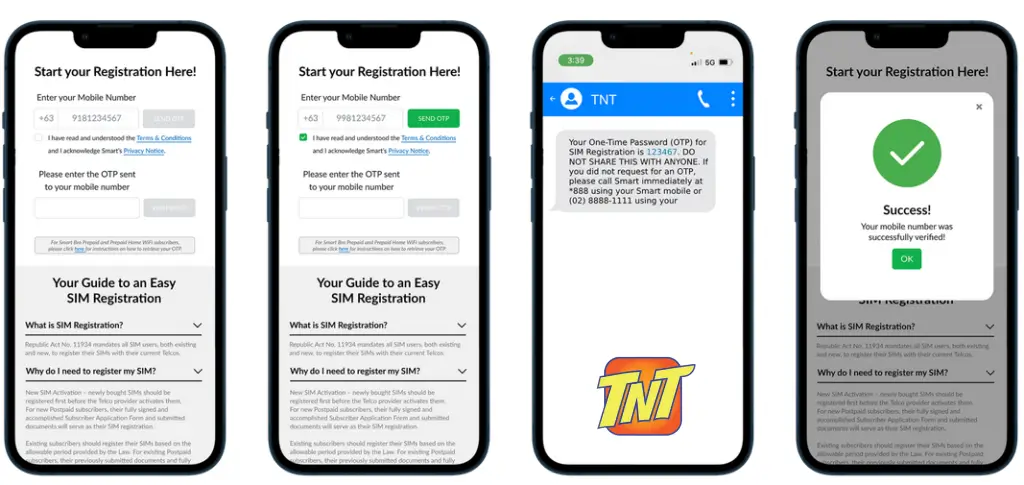
Step 1: Enter Mobile Number
Input your TNT mobile number in the provided field.
Step 2: OTP Verification
Click on Send OTP, accept the terms, and wait for the verification code.
Step 3: Start Registration
Enter the OTP to formally begin the registration process.
Fill Out the Online Registration Form
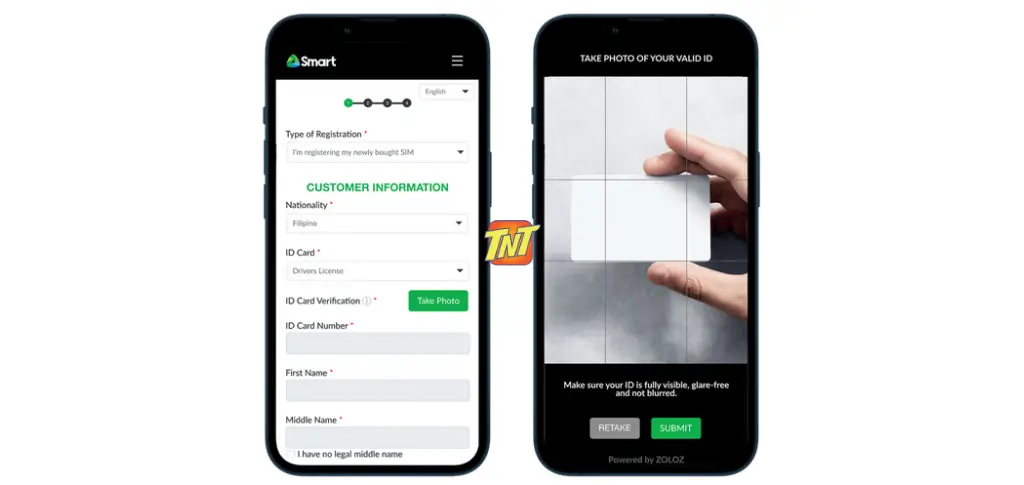
Complete the registration form by entering your personal details, including full name, date of birth, and address. Ensure that all information is accurate.
You will also be asked to upload a clear photo of your valid ID. Make sure the image is well-lit and readable to avoid rejection.
Face Verification Process
A face verification frame will appear on your screen. Position your face within the frame and remain still for a few seconds. This automated scan helps confirm your identity and adds an extra layer of security to the process.

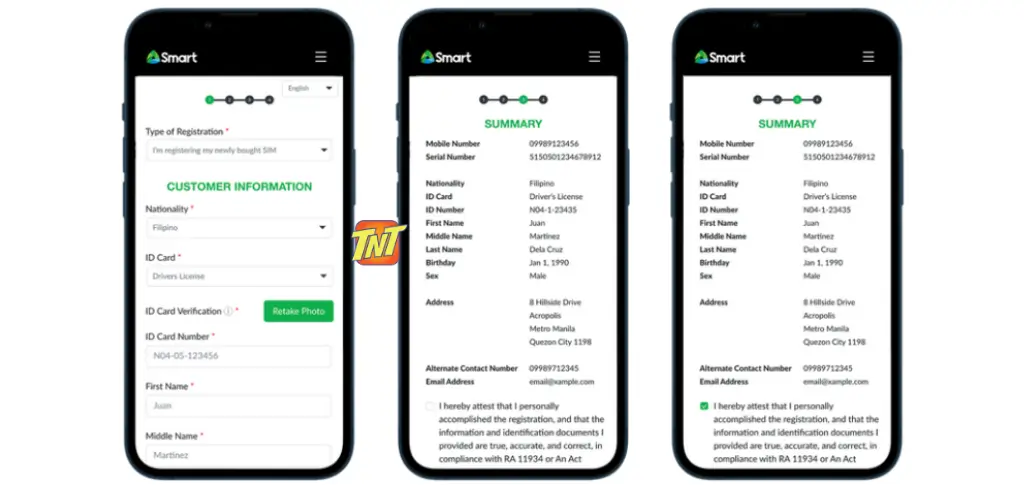
Re-Verification of Information
After submitting your details, you will be asked to re-enter the same information again. This step ensures accuracy and prevents mismatches.
Make sure that all details entered during re-verification exactly match the previously submitted information.
SIM Activation Confirmation
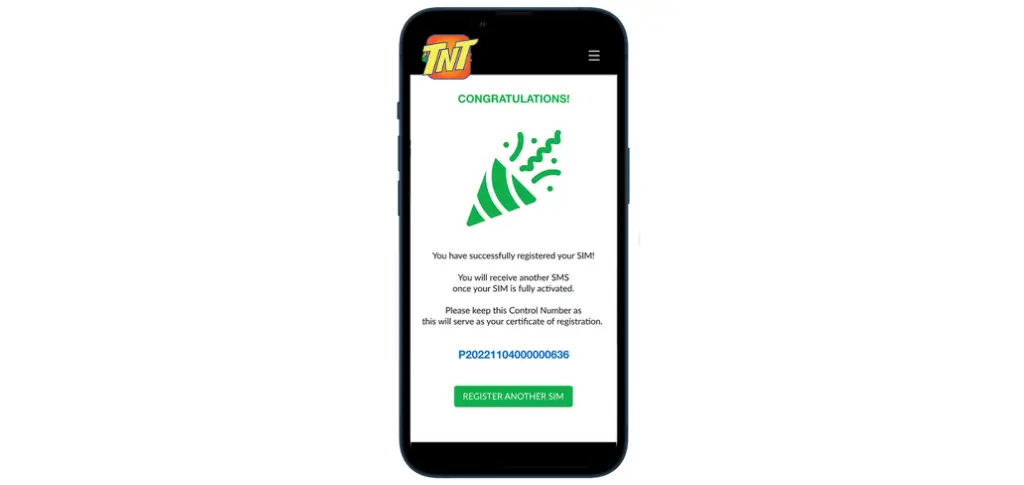
Once the information matches successfully:
- A confirmation message will appear
- A control or reference number will be provided
- You may receive a congratulatory notification
Your SIM will be activated shortly after, and you will receive a separate activation message.
Register TNT SIM Using the Mobile App
TNT also offers SIM registration through its official mobile application, available on both Android and iOS devices.
Download the TNT App
Install the official TNT app from your device’s app store. Always verify that the app is authentic before installing.
Create an Account
Open the application and create an account using your email or mobile number. Follow all the instructions to complete your profile setup.
Access SIM Registration Section
Navigate to the SIM Registration section within the app and enter your SIM number.
App Registration Steps:
- Open the TNT App
- Select SIM Registration
- Enter your mobile number and receive OTP
- Verify OTP
- Fill in customer information
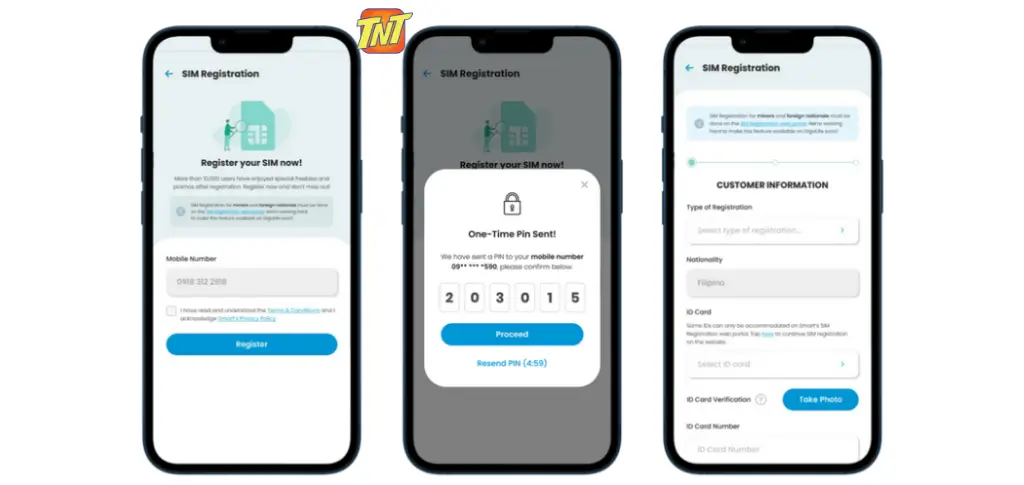
Upload Documents Through the App
Just like the online process, the app requires:
- Uploading a clear image of your valid ID
- Uploading a clear selfie for face verification
Follow the app instructions carefully to avoid errors.
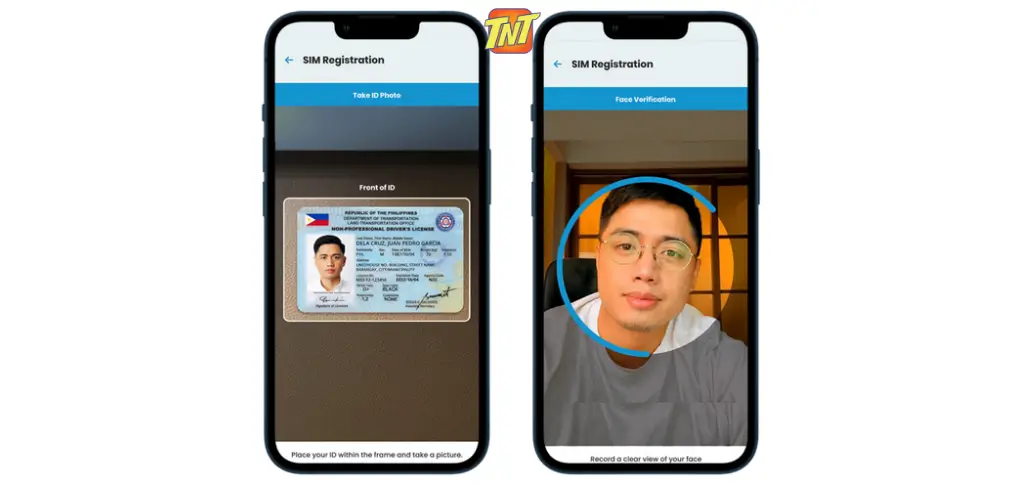
Address Information and Activation
Enter your complete address, including house number, street, and other required details. After confirmation, your SIM card will be activated, and a summary of your provided information will be displayed.
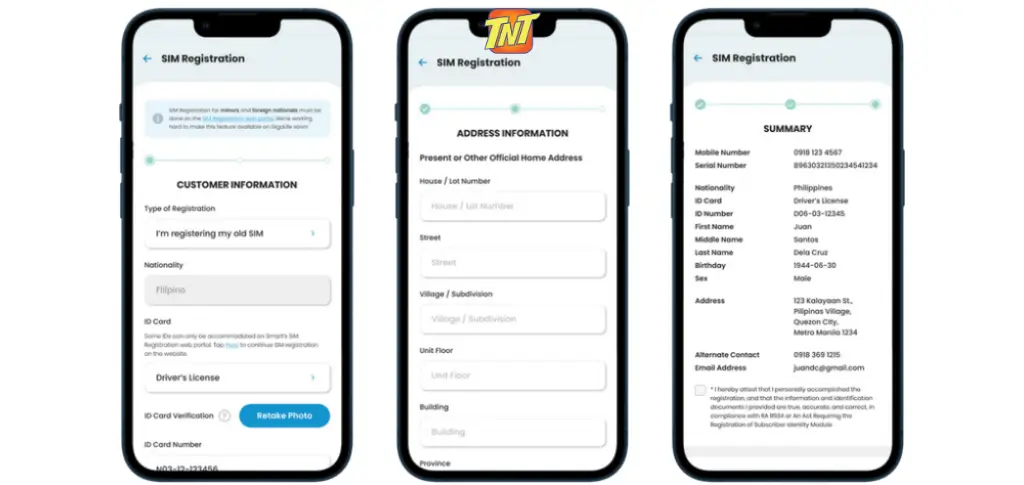
Traditional Way to Register TNT SIM
Users who prefer offline registration can visit an authorized TNT or Smart service center.
Required Steps at the Service Center:
- Present a valid ID
- Provide personal information
- Complete registration forms
Biometric Verification
In some cases, biometric data such as fingerprint or facial recognition may be required for added security.
Once verified, your SIM will be activated immediately. It is recommended to keep the registration receipt for future reference.
Handling Common Registration Issues
Invalid Identification Documents
Ensure your ID is valid and not expired. If rejected, upload a clearer image or use a different valid ID.
Technical Errors
Temporary system issues may occur. Ensure a stable internet connection and retry later if needed.
Contacting TNT Customer Support
If you face any registration difficulties, TNT customer support is available to assist you.
Customer Support Options:
- *Dial 888 from a TNT number
- Call (02) 8888-1111 from a landline
You can also reach out through TNT’s official social media channels for guidance.
Rewards for TNT SIM Registrants
TNT provides special rewards to users who successfully complete SIM registration.
For Existing Users:
- Free mobile data allocation
- Free calls and text promos
For New Users:
- Welcome data bundles
- Special introductory offers
Additional promotions may be introduced in the future.
Frequently Asked Questions
How long does TNT SIM registration take?
The process usually takes only a few minutes if all details are correct.
What if my SIM is not activated after registration?
Contact TNT customer support to resolve activation issues.
Can I register a TNT SIM without an ID?
No, a valid identification document is mandatory.
Is there a fee for SIM registration?
No, TNT SIM registration is completely free.
What happens if I don’t register before the deadline?
Unregistered SIM cards may be deactivated and become unusable.
Do foreign visitors need to register for a TNT SIM?
Yes, tourists and foreign visitors must register using valid travel documents.
How can I protect my privacy during registration?
Always register through official channels and never share your OTP.
Can I deregister my TNT SIM?
Yes, you can contact TNT if you no longer wish to use your SIM.
What if my personal details change?
Users should update their information with TNT to avoid future issues.
Final Note
TNT SIM registration is implemented to protect users and improve service quality. By completing registration, you ensure uninterrupted connectivity, better security, and access to exclusive offers. The process is simple, organized, and designed for user convenience.